The keypad was real
#OnyxAudit #Android #malware #bankingsecurity #mobilesecurity
The assumption that stopped working
For years the standard advice on Android banking malware rested on one idea: if the screen in front of you is the real banking app, your credentials are safe. Fake login screens were the threat, and spotting one was the defence.
Manic breaks that assumption. Documented publicly by ThreatFabric in August 2026, it combines banking fraud, spyware and remote device control, and it does not always need to show you a fake screen at all. It can capture PIN input while you are interacting with the genuine banking application.
The malware mainly targets users and services in Ukraine. Its monitored application list also includes banking and government eID apps used in Germany and other European countries. Those are two different things, and the distinction matters: a monitored list tells you what the malware watches for, not necessarily where it is being deployed.

How it gets on the device
Manic is distributed through malicious wrapper or dropper apps, including apps disguised as legitimate utilities. Later versions can hide their launcher icon, which means the absence of an unfamiliar icon in your app drawer proves nothing.
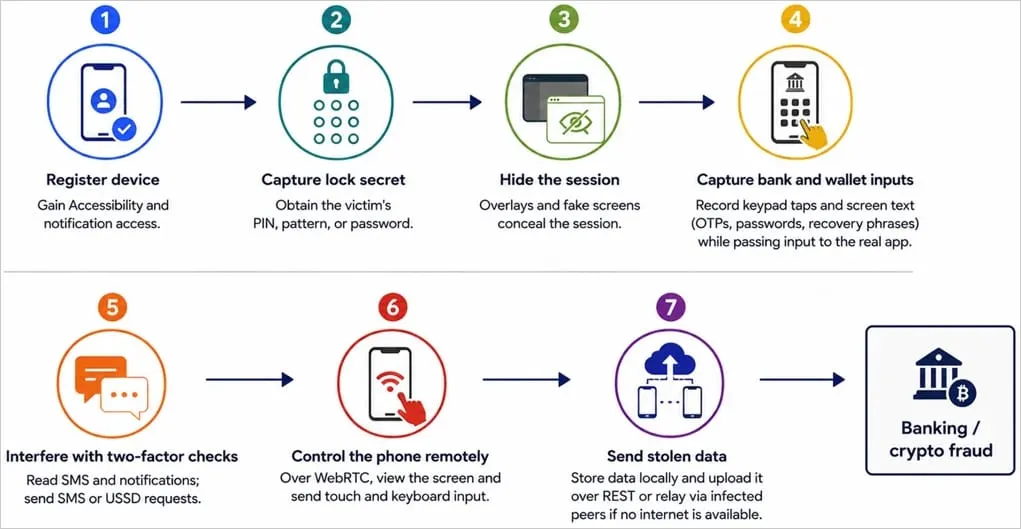
Once installed and granted sufficient privileges, it can use Accessibility Services to observe screen content, capture input, automate taps and remotely control the phone. It can also collect notifications, SMS messages, contacts, call history, location data, installed apps and selected files.
Taking the PIN from the real screen
The technique is called pinPadOverlay, and it is the part worth understanding properly.
Instead of displaying a complete fake banking interface, the malware can place an invisible interception area over the keypad of the legitimate banking app. When you tap a number, Manic records the position, and then reproduces the same tap on the real app underneath.
That reproduction step is what makes it work. From where you are sitting, the genuine banking app continues behaving exactly as it should. Nothing lags, nothing fails, nothing looks wrong, because nothing is wrong except that a second application recorded where your finger went.
Seeing the real banking app on your screen does not establish that your PIN cannot be observed by another application.
Remote control
Manic can establish WebRTC-based remote-control sessions. Combined with Accessibility, this allows an attacker to interact with the infected phone roughly as though they were holding it.
To conceal that activity, the malware can display black screens, fake screens or update-style screens while it operates in the background. It can also capture the device unlock PIN, password or pattern and attempt to reuse it later.
The consequence is worth stating plainly. An attacker operating the victim's own enrolled device sidesteps a great deal of fraud tooling built around the assumption that the attacker is logging in from somewhere else.
Moving data without a network connection
Manic has an unusual fallback for exfiltration.
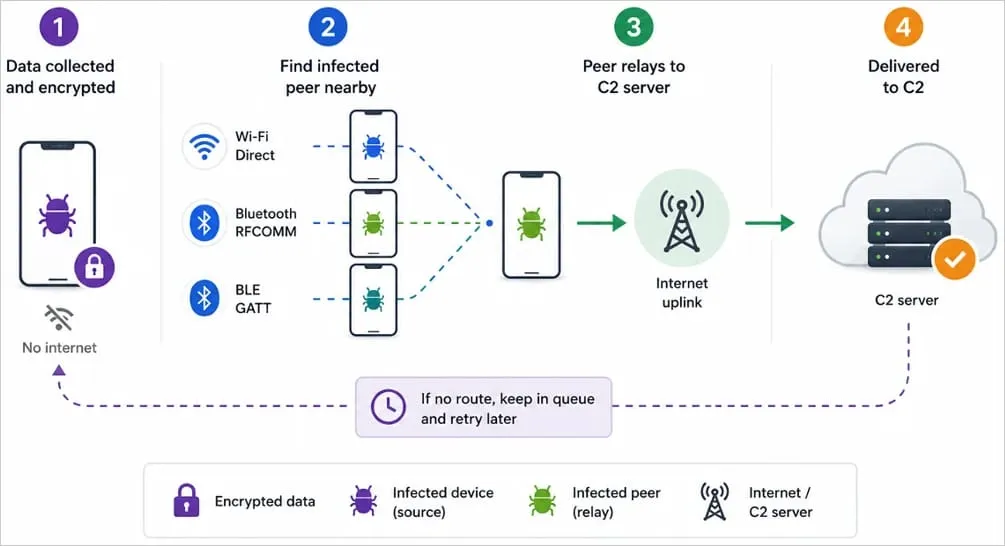
If an infected device cannot reach its command-and-control server directly, it can store collected data locally and look for another nearby device that is already infected with Manic. It can transfer encrypted data using Wi-Fi Direct, Bluetooth RFCOMM or Bluetooth Low Energy, and the nearby infected phone then forwards the data onward. Relaying through multiple infected devices is possible, with a default maximum of four hops.
This does not mean Manic infects clean phones over Bluetooth. The public research describes communication between devices that are already compromised. That distinction gets lost almost immediately in retelling, and it is the difference between an exfiltration fallback and an airborne infection vector.
Signs worth investigating
Manic is built to stay hidden, but several conditions should prompt a look regardless of what caused them.
- An unknown app has Accessibility enabled.
- An unfamiliar app can read notifications.
- An unknown app can display over other apps.
- A sideloaded app asks you to allow Restricted Settings.
- Google Play Protect is unexpectedly disabled.
- A recently installed app disappears from the launcher.
- Unexpected black or fake update screens appear.
- The camera privacy indicator appears without an obvious reason.
Battery drain and increased network traffic can also occur, but those symptoms are far too generic to prove an infection on their own.
Checking your own device
Open Settings and work through the following.
Accessibility. Check which downloaded or installed services are enabled.
Notification access. Look for unknown apps permitted to read all notifications.
Display over other apps. Review which apps hold overlay permission.
All files access. Look for applications with unexpectedly broad storage access.
Apps. Inspect the complete installed-app list, not only what appears in your launcher.
Google Play Protect. Confirm it is enabled, and run a scan.
One powerful permission does not automatically mean an application is malicious. Plenty of legitimate software needs Accessibility to do its job. Combinations are what raise the temperature: Accessibility together with notification access, overlay permission and sideloaded installation is a materially different picture from any one of those alone.
Accessibility alone may be entirely legitimate. Accessibility on a sideloaded app is worth a second look. Accessibility with notification access and overlays is a high-risk combination. A known malware indicator on top of that warrants immediate investigation.
Package names
ThreatFabric has published several package identifiers connected to analysed Manic samples:
- tech.intel.dialer.updater
- org.lenovo.storage.processor
- tech.apple.dialer.scheduler
- io.motorola.secure.executor
- org.honor.secure.helper
- dev.huawei.media.helper
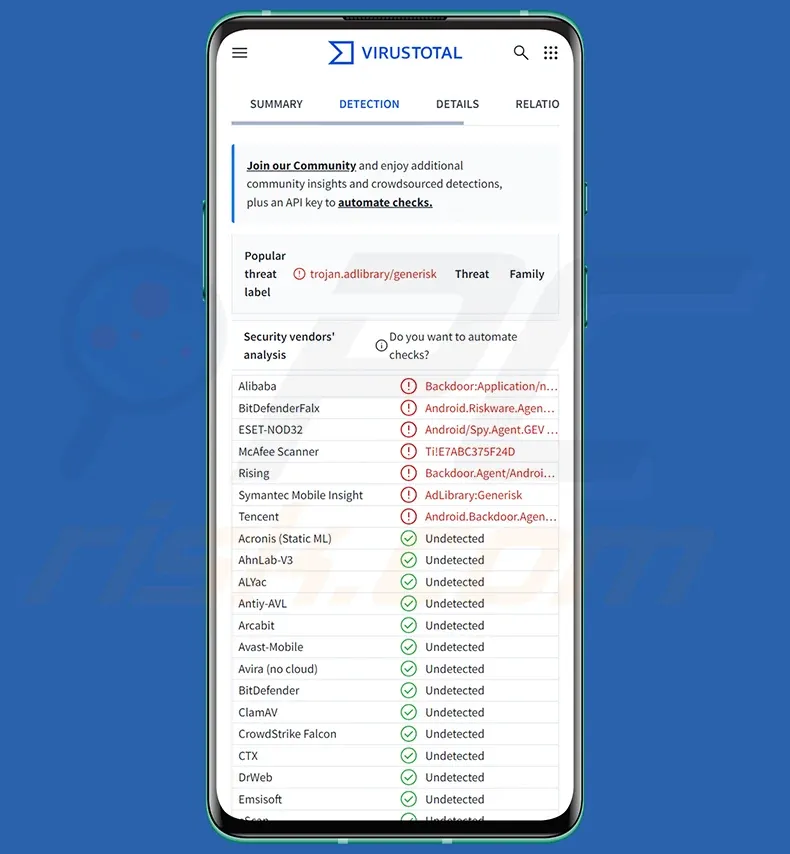
If one of these is installed on your phone, investigate immediately. The absence of these names does not prove a device is clean, because attackers can change package names between builds, and the naming convention here is deliberately chosen to look like manufacturer software at a glance.
If you suspect infection
- Stop entering banking credentials or passwords on the suspected device.
- Disable mobile data, Wi-Fi and Bluetooth.
- From another trusted device, contact your bank if financial credentials may have been exposed.
- Review Accessibility, notification access and overlay permissions.
- Remove suspicious sideloaded apps.
- Confirm Google Play Protect is enabled, and run a scan.
- Change affected passwords and the device unlock PIN after the device has been cleaned.
- If you cannot confidently remove the infection, consider a factory reset.
The takeaway
Manic matters less as a specific piece of malware than as a demonstration that a familiar defensive heuristic has expired. A real banking screen, a fully patched Android version and the absence of a suspicious launcher icon do not, individually or together, establish that a phone is safe.
Detection built on filenames, package names and hashes will keep losing ground, because those are the cheapest things for an attacker to change. What is harder to disguise is the set of privileges an application needs in order to do this at all.
The useful question has shifted. It is no longer whether you can spot a fake screen. It is which applications on your device are permitted to observe your screen, control your device, read your notifications and draw over other apps.
Sources
- ThreatFabric, "Manic: Blend between Banking Malware and Spyware", August 2026.
- The Hacker News, technical coverage of Manic, August 2026.
- BleepingComputer, coverage of Manic, August 2026.
- Google Android Help, Restricted Settings documentation.
- Google Play Help, Google Play Protect documentation.
- Android Exploits, in-app threat briefing on Manic, accessed 28 August 2026. Technical claims independently checked against ThreatFabric's published research; claims that could not be confirmed were removed.
Based on publicly available technical research as of 28 August 2026. Malware capabilities and indicators change as threat actors update their tooling.
Clayton Bax
Published under ONYX Digital Intelligence Following the #OnyxAudit methodology.
- X: @onyxaudit
- Email: onyxdigitalintelligence85@protonmail.com
- https://github.com/Baximus855
- @Onyx_Digital@mastodon.social
"Adjacent to true is not true."
Truth has no flag nor favour, only a standard. And it's heavy